

Concepts
We will cover the following concepts:- Tools for reading from SQL databases
- The LangGraph Graph API, including state, nodes, edges, and conditional edges.
- Human-in-the-loop processes
Setup
Installation
LangSmith
Set up LangSmith to inspect what is happening inside your chain or agent. Then set the following environment variables:1. Select an LLM
Select a model that supports tool-calling:- OpenAI
- Anthropic
- Azure
- Google Gemini
- Bedrock Converse
2. Configure the database
You will be creating a SQLite database for this tutorial. SQLite is a lightweight database that is easy to set up and use. We will be loading thechinook database, which is a sample database that represents a digital media store.
For convenience, we have hosted the database (Chinook.db) on a public GCS bucket.
@langchain/classic/sql_db module to interact with the database. The wrapper provides a simple interface to execute SQL queries and fetch results:
3. Add tools for database interactions
We’ll create custom tools to interact with the database:4. Define application steps
We construct dedicated nodes for the following steps:- Listing DB tables
- Calling the “get schema” tool
- Generating a query
- Checking the query
5. Implement the agent
We can now assemble these steps into a workflow using the Graph API. We define a conditional edge at the query generation step that will route to the query checker if a query is generated, or end if there are no tool calls present, such that the LLM has delivered a response to the query.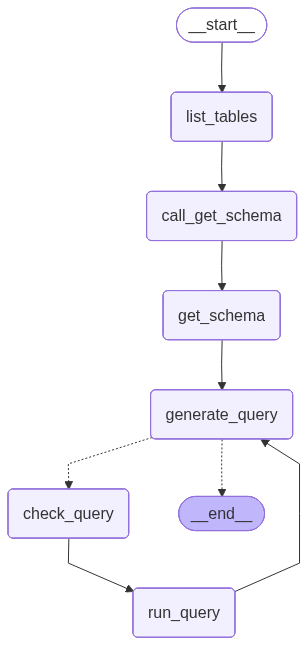
6. Implement human-in-the-loop review
It can be prudent to check the agent’s SQL queries before they are executed for any unintended actions or inefficiencies. Here we leverage LangGraph’s human-in-the-loop features to pause the run before executing a SQL query and wait for human review. Using LangGraph’s persistence layer, we can pause the run indefinitely (or at least as long as the persistence layer is alive). Let’s wrap thesql_db_query tool in a node that receives human input. We can implement this using the interrupt function. Below, we allow for input to approve the tool call, edit its arguments, or provide user feedback.
The above implementation follows the tool interrupt example in the broader human-in-the-loop guide. Refer to that guide for details and alternatives.